
Hello friends! If you love creating stylish and attractive photos, then you have probably heard about AI photo editing. Nowadays, ChatGPT and AI image generation tools are making photo editing more creative and easier than ever.
In this article, we are sharing the Rajan Editz ChatGPT Prompt, a collection of creative photo editing prompts that you can use to generate amazing AI images.
Whether you want to create a stylish boy portrait, cinematic photography, royal look, or Instagram-style photo, these prompts can help you explore different creative ideas.
The best part is that you don’t need advanced photo editing skills. You just need a good-quality photo, a suitable prompt, and an AI image generation tool.
Let’s explore the prompts and learn how to create these beautiful images step by step.
What Is Rajan Editz ChatGPT Prompt?
Rajan Editz ChatGPT Prompt is a collection of creative AI photo editing instructions designed to help users generate attractive images with ChatGPT and compatible AI image tools.
A prompt is simply a written instruction that explains how you want your final image to look.
For example, you can describe a person’s outfit, background, lighting, camera angle, and photo style. The AI tool uses these instructions to generate an image according to your description.
You can experiment with different styles and create unique pictures for your social media profiles.
What Can You Create Using Rajan Editz Prompts?
With these creative prompts, you can explore several types of AI images.
- Stylish boy photography
- Cinematic portrait images
- Royal king and queen looks
- Instagram profile pictures
- Romantic couple photography
- Nature background portraits
- Professional photoshoots
- Fantasy and artistic images
The final result may vary depending on the AI tool, uploaded photo, and prompt instructions.
5 Best Rajan Editz ChatGPT Photo Editing Prompts
Here are five original prompts that you can copy and try with your own photographs.
1. Stylish Boy AI Photo Editing Prompt
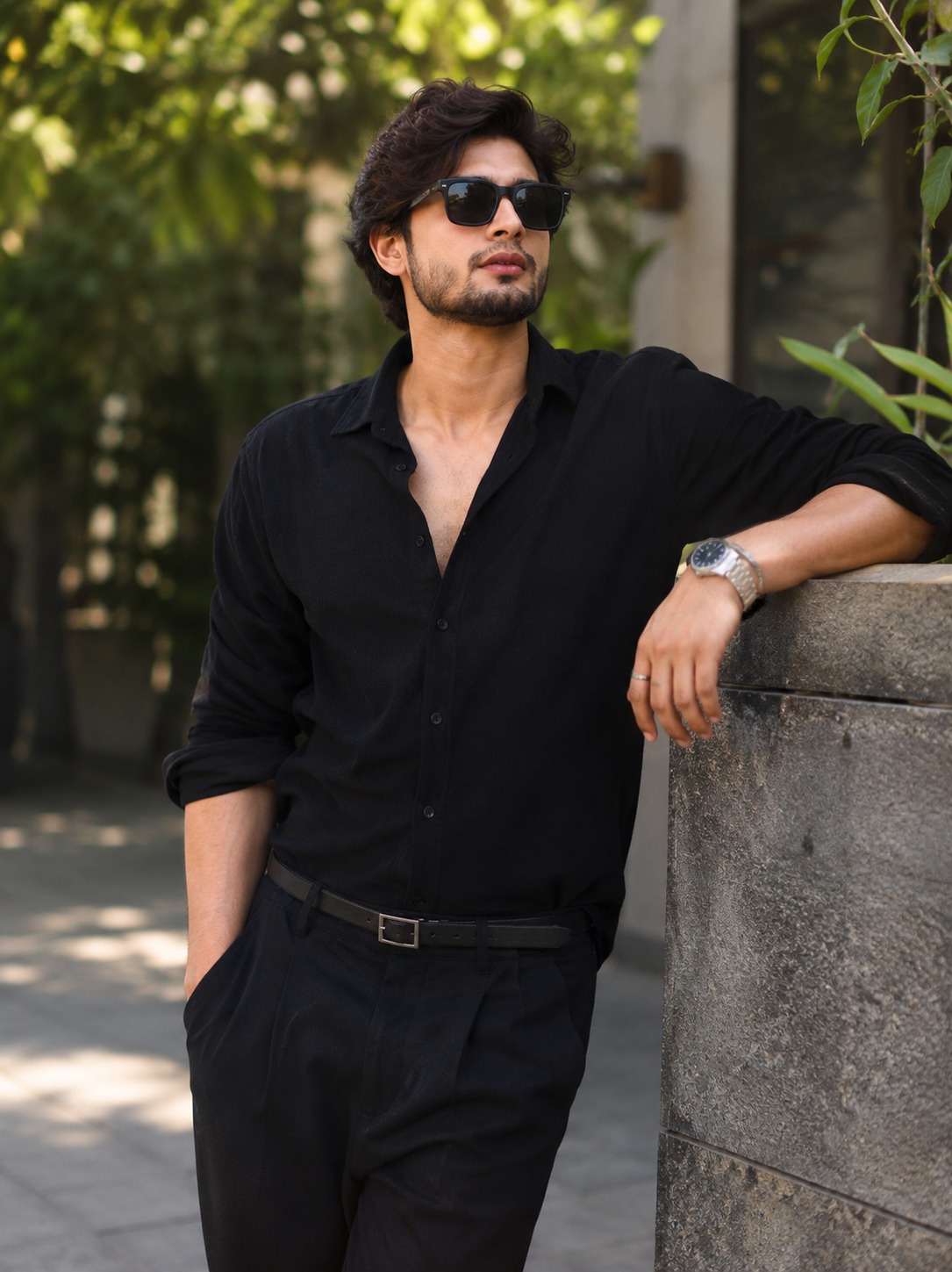
If you want to create a fashionable and stylish boy photo, try this prompt.
Copy This Prompt:
Create a highly realistic professional portrait using my uploaded reference photo.
Keep my original facial identity, face shape, hairstyle, and natural skin details
consistent. Dress me in a premium black outfit with stylish sunglasses.
Use a beautiful outdoor background with soft cinematic lighting, realistic shadows,
DSLR photography quality, and a modern fashion editorial look. Make the image sharp,
natural, and visually attractive.
What Image Will Be Created?
This prompt is designed to create a stylish portrait featuring a black outfit, sunglasses, and a cinematic outdoor background.
2. Cinematic Sunset AI Photo Prompt
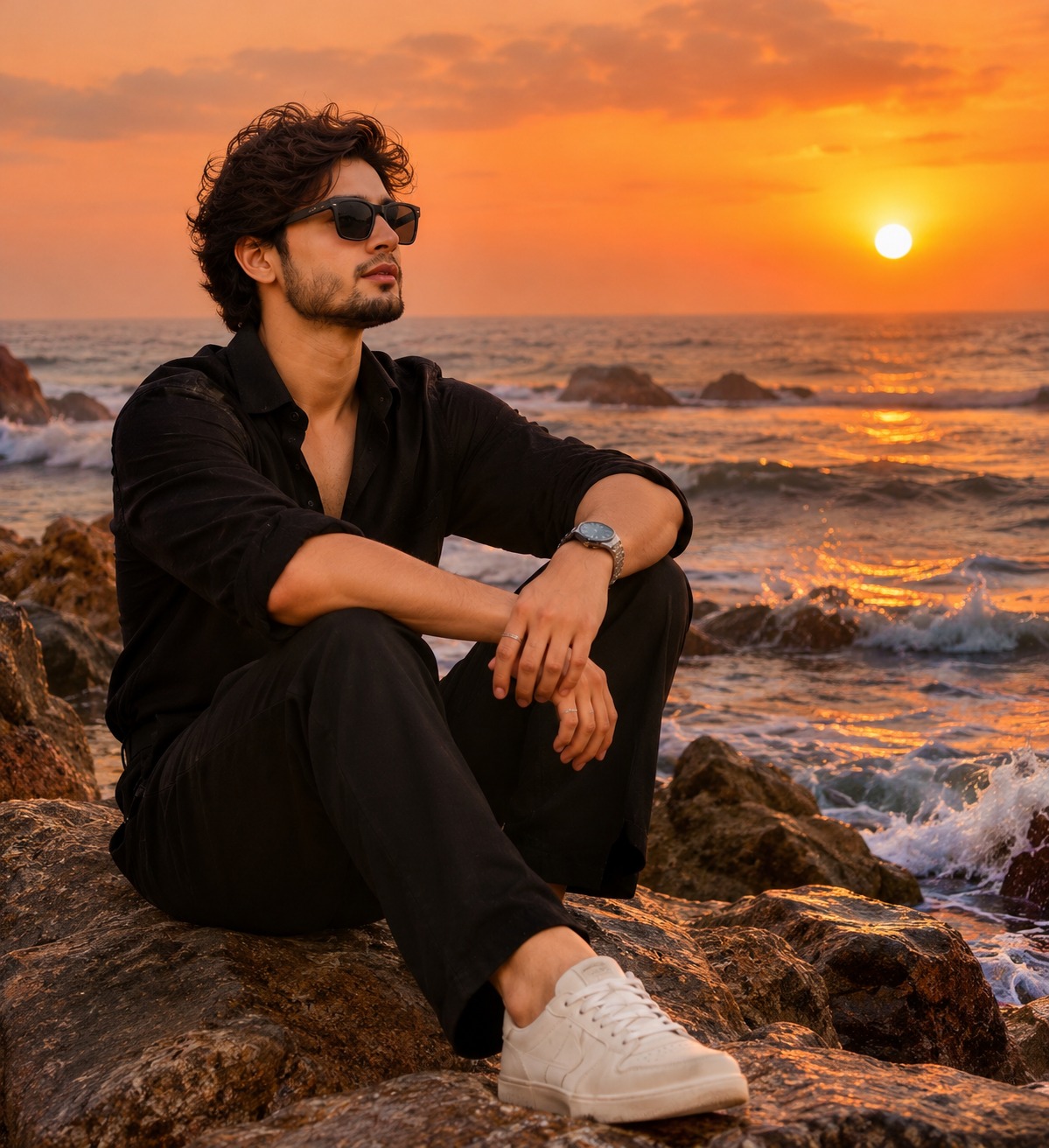
Want to create a beautiful sunset-style photograph? This prompt is a great creative idea.
Copy This Prompt:
Create a cinematic sunset portrait using my uploaded reference photo.
Preserve my facial identity and natural appearance. Show me sitting on a rock
near the ocean while looking toward the sunset. Add golden sunlight, realistic
ocean waves, warm orange color grading, natural shadows, and a beautiful cinematic
atmosphere. Use professional photography composition and realistic details.
What Image Will Be Created?
The result will have a warm sunset atmosphere, ocean background, and cinematic photography style.
3. Royal King AI Photo Editing Prompt
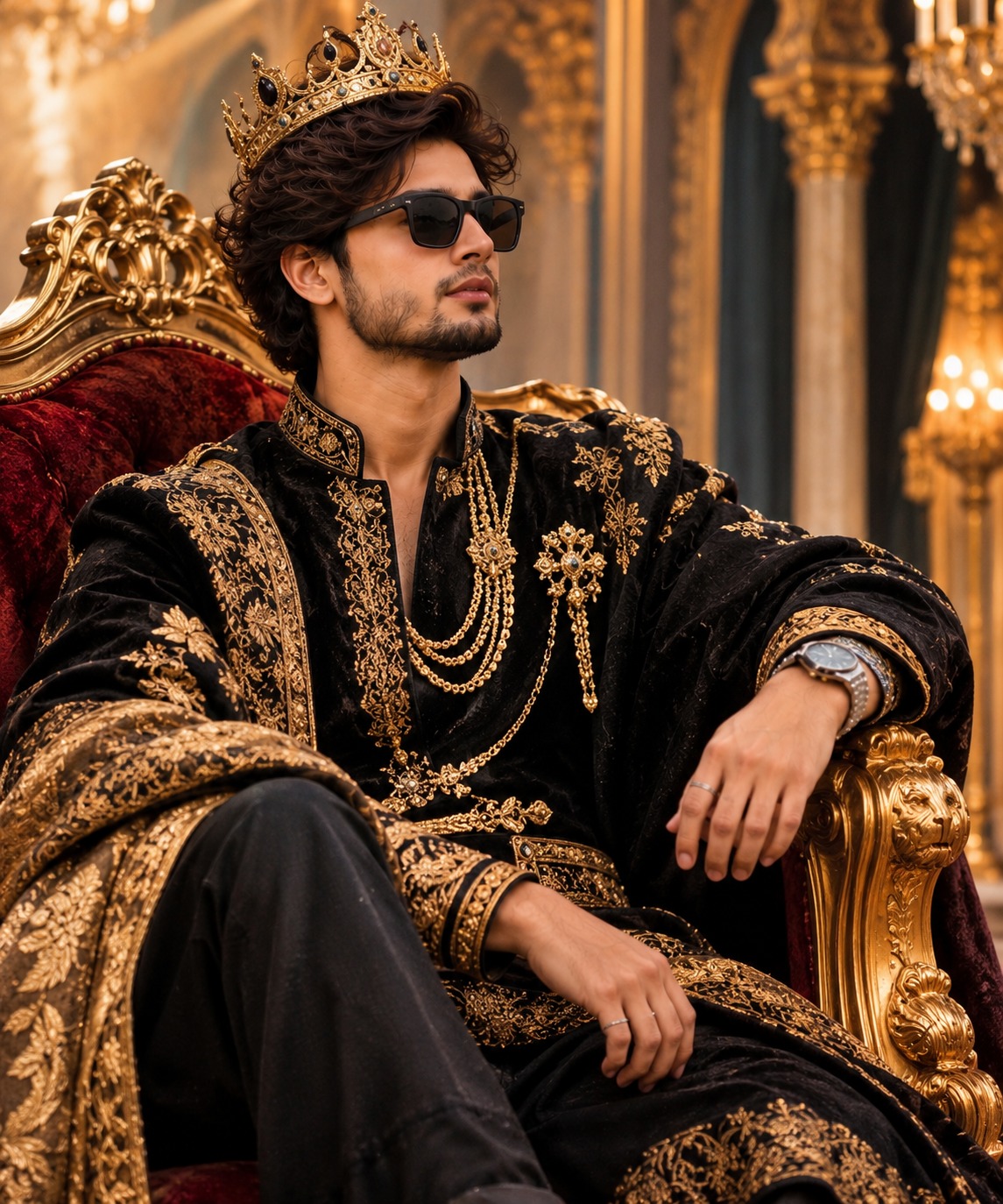
If you like royal and luxury photography, try this creative prompt.
Copy This Prompt:
Transform my uploaded reference photo into a realistic royal king portrait.
Preserve my original facial identity and natural facial features. Dress me in an
elegant black and golden royal outfit with a detailed crown. Add a luxurious palace
background, dramatic golden lighting, realistic fabric details, and professional
portrait photography. Make the final image elegant, cinematic, and highly detailed.
What Image Will Be Created?
This prompt aims to create a royal portrait with a golden crown, luxury outfit, and palace-style background.
4. Romantic Couple AI Photo Prompt
You can also experiment with romantic couple photography using AI.
Copy This Prompt:
Create a beautiful romantic couple portrait using the uploaded reference photographs.
Preserve the natural facial identities of both people. Show the couple standing together
in a peaceful outdoor location during golden hour. Add warm sunset lighting, a softly
blurred background, natural expressions, realistic skin texture, and professional
cinematic photography. Keep the composition elegant and realistic.
What Image Will Be Created?
This prompt is designed to generate a romantic sunset photograph with natural lighting and a beautiful background.
5. Nature Background AI Photo Prompt
If you love nature photography, this prompt can help you create a beautiful outdoor portrait.
Copy This Prompt:
Create a realistic outdoor portrait using my uploaded reference photo.
Preserve my original face and natural appearance. Place me beside a beautiful
mountain lake surrounded by green trees and mountains. Add soft natural sunlight,
realistic reflections in the water, cinematic color grading, and professional DSLR
photography. Make the background detailed and the final photograph visually balanced.
What Image Will Be Created?
The result will feature a natural outdoor environment with mountains, green trees, and a peaceful lake.
How To Use Rajan Editz ChatGPT Prompt?
If you are new to AI photo editing, follow these simple steps.
Step 1: Open ChatGPT
First, open ChatGPT on your smartphone or computer.
Step 2: Select Your Photo
Choose a clear photograph from your gallery that you want to edit.
Step 3: Copy Your Favourite Prompt
Select any of the five prompts shared above and copy the complete text.
Step 4: Upload Your Photo
Upload your photograph to ChatGPT if image upload and editing are available in your account.
Step 5: Paste Your Prompt
Paste your selected prompt and ask ChatGPT to create an image using your uploaded photograph.
Step 6: Generate Your AI Image
Wait for the image generation process to finish. If the result is not exactly what you expected, improve your prompt and try again.
Step 7: Save Your Image
Once you are happy with the final result, save your image and share it on your favourite social media platforms.
Tips To Get Better AI Photo Editing Results
Follow these tips to improve your AI-generated photographs:
- Always use a clear and high-resolution reference photo.
- Write detailed but understandable prompts.
- Describe the background and lighting clearly.
- Mention the outfit and photography style you want.
- Use natural facial and skin details for realistic results.
- Avoid adding too many unrelated instructions.
- Review the final image before sharing it.
Is Rajan Editz ChatGPT Prompt Free?
The prompts shared in this article are free to copy and try.
However, some AI image generation features may have usage limits depending on your account, selected tool, and subscription plan.
Before using any third-party AI editing website, check its pricing and privacy policy.
Frequently Asked Questions (FAQs)
1. What Is Rajan Editz ChatGPT Prompt?
It is a collection of creative AI photo editing prompts that can help users generate stylish, cinematic, royal, and professional-looking images.
2. Can I Use These Prompts for Free?
Yes, you can copy and try the prompts shared in this article. However, the AI image generation tool you use may have free usage limits.
3. Can ChatGPT Edit My Original Photo?
ChatGPT may support image editing and generation depending on the features available to your account. You can upload a photograph and describe the changes you want.
4. Which Photo Is Best for AI Editing?
A clear, well-lit photograph with visible facial features is generally a good starting point.
5. Can I Share AI-Generated Photos on Instagram?
Yes, you can share your AI-generated photos on Instagram and other social media platforms. Follow the platform’s content and disclosure rules where applicable.
6. Why Does My AI Photo Look Different From My Original Photo?
AI tools may interpret prompts differently and sometimes change facial or other image details. Try using a clearer reference photo and explicitly instruct the tool to preserve your original facial identity.
Conclusion
Rajan Editz ChatGPT Prompt is a useful collection of creative ideas for anyone interested in AI photo editing. With the five prompts shared in this article, you can experiment with stylish boy portraits, cinematic sunset photography, royal looks, romantic couple images, and beautiful nature backgrounds.
You don’t need professional editing experience to get started. Just upload your photo, copy your favourite prompt, and explore different creative possibilities with AI.
We hope you enjoyed these Rajan Editz ChatGPT prompts. If you create an amazing AI photo using these ideas, share your experience in the comments.
Don’t forget to share this article with your friends who love photography and AI editing.
Thanks for visiting our website. Keep creating and stay creative!