
Hello friends! Welcome to Edit Templates. If you love photography and want to create amazing pictures using Artificial Intelligence, then this article is for you.
Nowadays, AI photo editing is becoming a popular trend on Instagram, Facebook, and other social media platforms. People are using AI tools to transform ordinary photographs into stylish portraits, cinematic pictures, 3D images, and professional-looking photos.
In this article, we are going to share some unique AI Photo Editing Rajan Editz Prompts that you can copy and use to create beautiful AI photos.
You will also learn how to use these prompts, what type of images they can generate, and some useful tips to improve your results.
Let’s get started!
What Is AI Photo Editing Rajan Editz?
AI Photo Editing Rajan Editz is a creative photo editing guide featuring different AI prompts that help users create attractive and realistic photographs.
With the help of AI image generation tools, you can change the background, clothing, lighting, atmosphere, and overall photography style of your pictures.
You don’t need professional editing skills to experiment with these styles. Just upload your reference photo, enter a suitable prompt, and let the AI tool generate your creative image.
6 Best AI Photo Editing Rajan Editz Prompts
Here are six different AI photo editing prompts that you can try. Each prompt has a different photography style and creative result.
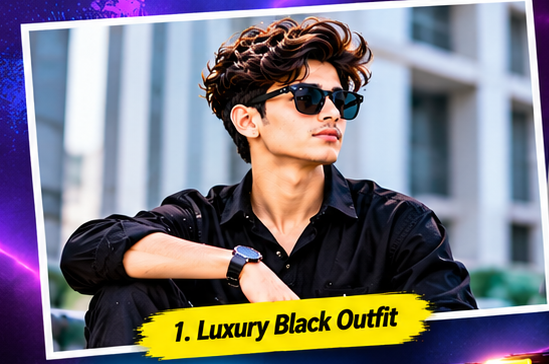
1. Luxury Black Outfit AI Photo Editing
This prompt is perfect for creating a premium and fashionable portrait. It gives your photo a luxury fashion photography appearance.
Copy This Prompt:
Create an ultra-realistic luxury fashion portrait using my uploaded reference photo.
Preserve my original facial identity, face shape, hairstyle, and natural skin details.
Dress me in a premium black shirt with elegant accessories and a luxury wristwatch.
Place me in a modern architectural location with soft cinematic lighting, realistic
shadows, professional DSLR photography, and a premium editorial color grade.
Make the final image sharp, natural, and highly detailed.
What Image Will Be Created?
A stylish portrait featuring a black outfit, luxury accessories, modern architecture, and professional fashion photography.
2. 3D Cartoon Style AI Photo Editing
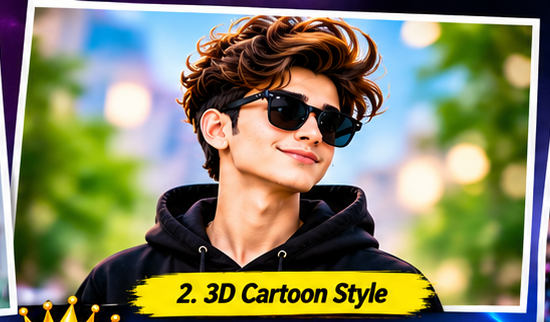
If you enjoy creative cartoon-style pictures, this prompt can help you experiment with a beautiful 3D character look.
Copy This Prompt:
Transform my uploaded reference photo into a high-quality 3D animated character portrait.
Keep my recognizable facial features, hairstyle, and overall appearance consistent.
Create a friendly and stylish character with expressive eyes, detailed hair,
realistic fabric textures, soft studio lighting, and a colorful modern background.
Use polished 3D animation quality with smooth details and professional composition.
What Image Will Be Created?
A colorful 3D animated character inspired by your original photograph.
3. Rainy Night Cinematic AI Photo
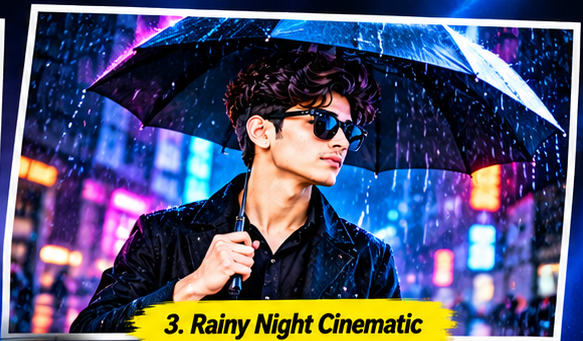
This prompt is suitable for people who love dramatic cinematic photography and nighttime backgrounds.
Copy This Prompt:
Create a realistic cinematic nighttime portrait using my uploaded reference image.
Preserve my original facial identity and natural facial details. Place me on a
beautiful city street during light rain. Add glowing neon lights, wet road reflections,
a stylish dark outfit, dramatic cinematic lighting, realistic rain drops, and
professional movie-style color grading. Use a shallow depth of field and high-quality
photography composition.
What Image Will Be Created?
A cinematic night portrait with neon lights, rainy streets, reflections, and a dramatic movie-inspired atmosphere.
4. Traditional Indian Royal Look AI Photo
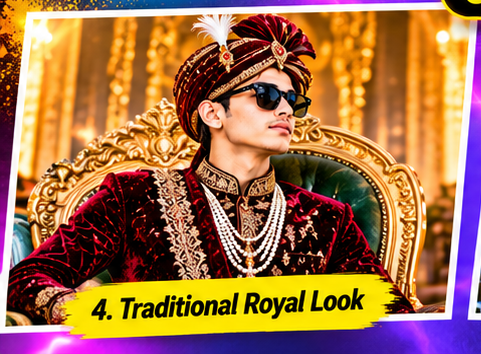
If you love traditional Indian fashion and royal photography, this prompt is worth trying.
Copy This Prompt:
Create a realistic traditional Indian royal portrait using my uploaded reference photo.
Preserve my original facial identity and natural appearance. Dress me in an elegant
traditional Indian outfit with beautiful embroidery and tasteful accessories.
Add a luxurious heritage palace background, warm golden lighting, detailed traditional
architecture, realistic fabric textures, and professional portrait photography.
Make the image elegant and visually rich.
What Image Will Be Created?
A royal traditional portrait with Indian clothing, elegant accessories, and a beautiful palace background.
5. Mountain Adventure AI Photo Editing
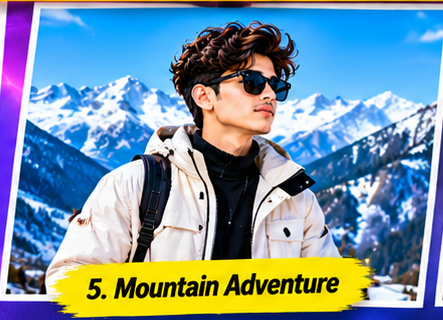
This prompt is ideal for creating beautiful travel-style photographs.
Copy This Prompt:
Create a highly realistic travel portrait using my uploaded reference photo.
Keep my facial identity and natural appearance unchanged. Show me standing near
a beautiful mountain viewpoint with snow-covered peaks, green valleys, and a clear
blue sky. Dress me in a stylish winter jacket and add natural sunlight, realistic
environmental details, professional travel photography, and cinematic color grading.
What Image Will Be Created?
A beautiful travel photograph featuring mountains, scenic views, winter fashion, and natural lighting.
6. Black and White Artistic Portrait
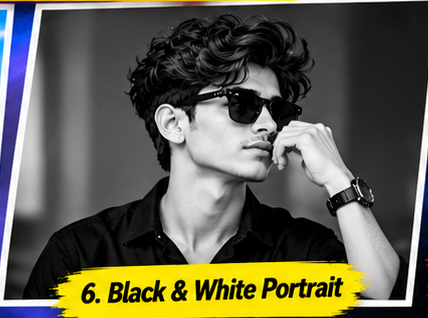
For those who love classic photography, this black and white editing prompt can create a timeless portrait.
Copy This Prompt:
Create an artistic black and white portrait using my uploaded reference photograph.
Preserve my original facial identity, natural facial features, and hairstyle.
Use dramatic studio lighting with beautiful highlights and deep shadows.
Add a simple dark background, realistic skin texture, sharp facial details,
professional monochrome photography, and an elegant editorial composition.
Make the final photograph clean, realistic, and artistic.
What Image Will Be Created?
A classic monochrome portrait with dramatic shadows, detailed facial features, and professional studio lighting.
How To Use AI Photo Editing Rajan Editz Prompts?
Follow these simple steps to create your own AI photographs.
- Open ChatGPT on your smartphone or computer.
- Select a clear photograph from your gallery.
- Copy your favourite AI photo editing prompt from this article.
- Upload your photograph to ChatGPT if image generation and editing are available.
- Paste the copied prompt into the chat.
- Ask ChatGPT to create an image using your uploaded photograph.
- Wait for the image generation process to finish.
- Review the result and make adjustments if needed.
- Save your final AI-generated image.
You can repeat the process with different prompts to explore more photography styles.
Best Tips for Creating High-Quality AI Photos
To get better results from AI photo editing tools, keep these tips in mind:
- Use clear and high-resolution reference photographs.
- Choose images with good lighting and visible facial details.
- Write specific and easy-to-understand prompts.
- Mention the background, outfit, lighting, and camera style.
- Avoid unnecessary instructions in your prompts.
- Check the final image for unwanted changes.
- Respect other people’s privacy before uploading their photographs.
Which AI Tools Can Be Used for Photo Editing?
Different AI-powered tools offer different photo generation and editing features.
You can explore:
- ChatGPT: For creating and editing images using written instructions and reference photos.
- Canva: For creative designs and AI-assisted visual editing.
- Adobe Firefly: For AI-powered creative image generation and editing.
- Google Gemini: For AI image generation and supported photo editing features.
Features, availability, and usage limits may vary between tools and account plans.
Is AI Photo Editing Rajan Editz Free?
The prompts provided in this article are free to copy and use.
However, the availability of AI photo generation depends on the tool you select. Some platforms offer limited free usage, while others provide additional features through paid subscriptions.
Always check the official pricing and usage conditions before using an AI editing service.
Frequently Asked Questions (FAQs)
1. What Is AI Photo Editing Rajan Editz?
It is a collection of creative AI photo editing ideas and prompts that help users experiment with different photography styles.
2. Can I Use Rajan Editz AI Prompts for Free?
Yes, you can copy and try all the prompts shared in this article. AI image generation may have separate usage limits.
3. Can I Create Stylish Boy Photos Using ChatGPT?
Yes. You can upload a suitable reference photograph and use a detailed prompt to experiment with stylish outfits, backgrounds, and lighting.
4. How Can I Make My AI Photos Look Realistic?
Use clear reference photos and describe natural skin texture, realistic lighting, facial details, and professional photography in your prompt.
5. Can I Use AI Photos on Instagram?
Yes, you can share AI-generated photographs on social media. Make sure you follow the platform’s content and disclosure policies.
6. Why Does AI Change My Original Face?
AI tools may sometimes interpret facial details differently. Use a clear reference photo and specifically instruct the tool to preserve your facial identity. Results can still vary.
Conclusion
AI Photo Editing Rajan Editz is a great topic for anyone who loves creative photography and wants to explore the possibilities of Artificial Intelligence.
In this article, we shared six different AI photo editing prompts covering luxury fashion, 3D cartoon portraits, cinematic night photography, traditional Indian royal looks, mountain adventures, and black and white portraits.
You can copy these prompts, upload your reference photograph, and experiment with different styles using compatible AI tools.
We hope these prompts help you discover new creative ideas and make your photographs more attractive.
If you enjoyed this article, share it with your friends and let us know in the comments which AI photo editing style you liked the most.
Thank you for visiting Rajan Editz! Keep creating and stay creative.