
Diwali is one of those festivals when everyone loves capturing beautiful pictures. From traditional outfits and festive decorations to glowing diyas and warm lights, there are so many ways to make your photos look special.
Recently, AI photo editing has made it easier to create festive portraits without arranging a professional photoshoot. With the right prompt and a reference photo, you can transform an ordinary picture into a beautiful Diwali-inspired portrait.
In this guide, you’ll find a Trending Diwali AI Photo Editing Prompt that you can copy and use with an AI image-generation tool. The idea is to create a realistic festive photograph while keeping the person’s original facial identity recognizable.
Trending Diwali AI Photo Editing Prompt
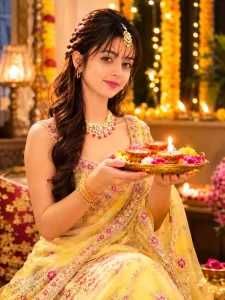
This prompt creates a warm, traditional Diwali portrait featuring a woman in a yellow floral festive outfit, holding a decorated brass thali with glowing diyas. The background has warm fairy lights, candles, and festive decorations.
Copy the prompt below and try it with your own reference photo.
AI Photo Editing Prompt
Create a highly realistic, professional festive portrait using the uploaded reference photo as the identity reference. Preserve the woman's original facial features, face shape, eyes, nose, lips, skin tone, and natural expression as closely as possible. Do not replace or redesign her face.

She is wearing a beautiful traditional Indian festive outfit in soft yellow with delicate colorful floral embroidery, a matching blouse, and a gracefully draped dupatta over her shoulder. Style her with elegant traditional jewelry, including a delicate necklace, earrings, golden bangles, and a subtle maang tikka.

Give her a natural, graceful pose while she sits comfortably and holds a beautifully decorated brass thali filled with glowing diyas and fresh colorful flower petals in both hands. Her head is slightly tilted, with a gentle smile and eyes naturally open, looking towards the camera.

Create a beautiful Diwali background with warm golden fairy lights, glowing candles, marigold decorations, and softly blurred festive details. Add subtle foreground bokeh from glowing diyas to create depth.

Use realistic skin texture, natural body proportions, accurate hands and fingers, realistic fabric folds, and natural lighting. The final image should look like a real photograph taken during a professional Diwali photoshoot, not an artificial illustration.

Vertical portrait composition, cinematic warm lighting, high detail, natural colors, realistic photography.

Important: Use your own photo as the reference image. AI tools may still make small changes to facial details, so check the result before using it.
How to Create Your Diwali AI Photo
You don’t need professional photography or editing experience. Follow these simple steps:
- Open an AI image-generation tool that supports reference image uploads.
- Upload a clear photo of yourself with your face visible.
- Copy the Diwali AI photo editing prompt from this article.
- Paste the prompt into the tool.
- Generate the image and review the result.
- If the face, hands, or outfit look unnatural, try generating again with a more specific instruction.
For better results, choose a clear reference photo with good lighting and minimal face obstruction.
Tips for More Realistic Diwali AI Photos
A good prompt makes a difference, but your reference photo and final result matter too.
- Use a clear reference photo: A front-facing or slightly angled picture can help the tool understand your facial features.
- Describe the outfit clearly: Mention the outfit color, embroidery, blouse, and dupatta so the styling stays consistent.
- Keep the lighting natural: Warm golden lighting works beautifully for Diwali portraits.
- Check the hands and fingers: AI-generated hands can sometimes look unusual. Regenerate if necessary.
- Avoid excessive effects: Too much glow, smoothing, or artificial skin texture can make a photo look less realistic.
Final Thoughts
You don’t need an expensive photoshoot to experiment with festive photography. With a good reference picture and a detailed prompt, you can create your own beautiful Diwali-inspired AI portrait.
Try this Trending Diwali AI Photo Editing Prompt, experiment with different festive outfit colors, and create a look that matches your personal style.
If you create an image using this prompt, you can share your result and try changing the outfit, background, or pose to make it your own.
Note: AI-generated results may vary depending on the tool, reference photo, and settings. This website is not affiliated with or endorsed by any AI image-generation platform.
Some of query is covered- Diwali AI photo editing, Diwali AI prompt, Diwali photo editing prompt, trending Diwali photo prompt, AI Diwali photoshoot, festive AI photo prompt, Indian girl Diwali AI prompt, traditional Diwali portrait, AI festive photo editing, Diwali portrait prompt, yellow lehenga AI prompt, AI image generation prompt