
Friends, Diwali is one of the most beautiful festivals, and everyone loves capturing special moments during the celebration. If you also want to create a beautiful and realistic Diwali photo, you are in the right place!
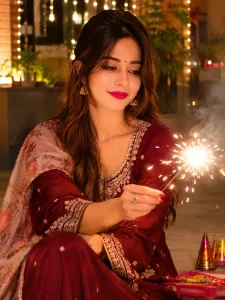
In today’s post, I’m sharing a special Diwali Photo Prompt that you can use to create a festive portrait with an AI image-generation tool. The look features a traditional maroon outfit, elegant jewelry, warm fairy lights, and a glowing sparkler. It gives the photo a natural and cinematic Diwali atmosphere.
You don’t need professional photography equipment or an expensive photoshoot. Simply upload your reference photo, copy the prompt below, and generate your own festive portrait.
What Is a Diwali Photo Prompt?
A Diwali Photo Prompt is a text description that tells an AI image-generation tool how you want your photo to look. It can describe your outfit, hairstyle, pose, lighting, background, and other details.
For example, you can create a traditional Indian festive look with a beautiful outfit, glowing lights, and a sparkler in your hand. You can also experiment with different colors, poses, and decorations to create a style that matches your personality.
Diwali Photo Prompt – Copy Here
If you want to create a photo similar to the example above, use the following prompt. Upload a clear reference photo first if your AI tool supports image uploads.
AI Image Prompt:
Create a highly realistic and professional Diwali portrait of the woman in the uploaded reference photo.

Preserve her recognizable facial features, natural face shape, eyes, nose, and smile.

She is wearing an elegant deep maroon traditional Indian suit with delicate golden embroidery and a matching soft floral dupatta draped naturally over her shoulder.

Style her with subtle traditional earrings, a small red bindi, soft festive makeup, and long natural wavy hair.

She is sitting gracefully in a relaxed pose, holding a lit sparkler in one hand and looking gently toward it with a natural smile.

Create a beautiful Diwali evening background with warm golden fairy lights, softly glowing candles, subtle festive decorations, and a few colorful fireworks in the distant sky.

Use realistic skin texture, natural fabric folds, accurate hands and fingers, balanced warm lighting, and a softly blurred cinematic background.

Make the final photograph look like a real professional festive photoshoot, not an artificial or overly edited AI image.

Keep the composition vertical in a 9:16 aspect ratio.
How to Create a Diwali Photo Using This Prompt
Creating your own Diwali photo is quite simple. Follow these steps:
- First, open an AI image-generation tool that supports photo uploads and image prompts.
- Select a clear photograph of yourself that you want to use as a reference.
- Copy the Diwali Photo Prompt shared above.
- Paste the prompt into the AI tool.
- Generate the image and wait for the result.
- If the outfit, pose, or background is not quite right, adjust the prompt and try again.
- Save your favorite image and share it on Instagram, Facebook, or other social media platforms.
Tips for Getting Better Diwali AI Photos
Here are a few simple tips that can help you get a better result:
- Use a clear reference photo: A well-lit photo with your face clearly visible can help the AI tool follow your appearance.
- Describe the outfit properly: Mention the outfit color, embroidery, fabric, and dupatta style.
- Keep the pose natural: Simple sitting or standing poses often look more realistic.
- Choose warm lighting: Golden fairy lights and soft candlelight create a beautiful festive atmosphere.
- Check the final details: Before saving the image, check the face, hands, fingers, outfit, and background carefully.
- Try different variations: You can change the outfit color, hairstyle, or pose to create more Diwali looks.
Conclusion
Friends, I hope you liked this Diwali Photo Prompt and found it useful. With this prompt, you can create a beautiful festive portrait without arranging a professional photoshoot. Just upload your reference photo, copy the prompt, and try it with your preferred AI image-generation tool.
You can also experiment with different traditional outfits, backgrounds, and poses to create your own unique Diwali look. If you create a photo using this prompt, don’t forget to share your experience in the comments. Happy Diwali!