
Want to create a beautiful and realistic Diwali photo using AI? This Diwali AI Photo Prompt will help you transform your regular picture into a stunning festive portrait featuring a glowing diya, warm golden lighting, traditional Indian jewellery, and a beautiful cinematic atmosphere.
With ChatGPT AI image generation, you can create a professional-looking Diwali portrait using your own face as a reference. You don’t need a professional camera, studio, or expensive editing software.
In this tutorial, you will get a ready-to-use ChatGPT Diwali photo prompt, step-by-step instructions, and tips to create your own festive AI portrait.
What Does This Diwali AI Photo Look Like?
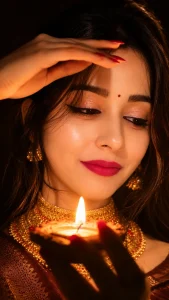
This AI-generated Diwali portrait features a beautiful Indian woman holding a glowing traditional clay diya close to her face. The warm orange light from the diya creates a soft golden glow, highlighting her facial features and traditional jewellery.
The portrait includes:
- A traditional Indian festive appearance
- A glowing clay diya with a bright flame
- Warm golden and orange cinematic lighting
- Beautiful traditional gold jewellery
- A small bindi and elegant festive makeup
- A dark, softly blurred background
- A peaceful expression with eyes gently looking towards the diya
The result is a realistic, elegant, and aesthetic Diwali portrait that you can share on Instagram, Pinterest, or other social media platforms.
ChatGPT Diwali AI Photo Prompt
Copy the prompt below and use it in ChatGPT along with your face reference image.
Copy This AI Prompt
Create a highly realistic, cinematic Diwali portrait using my uploaded reference photo as the face identity reference.

Preserve my original facial identity, facial structure, eyes, nose, lips, skin tone, and natural facial features. Do not change my identity or make my face look like someone else.

Create an intimate close-up portrait of an Indian woman celebrating Diwali. She is wearing an elegant traditional maroon saree with intricate golden embroidery, beautiful traditional gold jewellery, statement earrings, and a delicate gold necklace. Add a small, elegant bindi on her forehead. Do not add sindoor or any red powder in the hair parting.

Pose and Expression:

One hand is gently placed above her forehead, slightly shading her face from the light. Her other hand holds a traditional clay diya close to her chin. Her eyes are slightly open, naturally looking down towards the glowing diya flame. Give her a soft, peaceful expression with a subtle natural smile. Do not completely close her eyes.

Lighting and Photography:

The diya flame should create beautiful warm orange and golden light across her face. Use dramatic low-key cinematic lighting, deep shadows, realistic skin texture, soft highlights, and a dark blurred background. Add subtle reflections from the diya flame on her jewellery and hair.

Camera and Composition:

Extreme close-up portrait photography, vertical 9:16 composition, shallow depth of field, realistic DSLR photography, 85mm portrait lens, f/1.8 aperture, premium festive editorial photography, natural facial proportions, ultra-detailed textures, photorealistic quality.

Keep the diya flame clearly visible in the foreground. Maintain realistic hands and fingers. Avoid distorted facial features, extra fingers, artificial skin, cartoon effects, text, logos, and watermarks.

The final image should look like a professionally photographed Indian Diwali portrait, not an artificial AI illustration.
How to Create Your Diwali AI Photo Using ChatGPT
Follow these simple steps to generate your own Diwali portrait.
- Open ChatGPT on your mobile or desktop.
- Upload a clear photo of yourself as a face reference.
- Copy the Diwali AI photo prompt given above.
- Paste the prompt into ChatGPT.
- Ask ChatGPT to preserve your original facial identity and follow the reference pose.
- Generate the image and review the result.
- If needed, request small corrections such as adjusting the eye direction, diya position, lighting, or jewellery.
Tip: Use a clear, front-facing photograph with good lighting for better face consistency. AI-generated results may not perfectly preserve every facial detail, so you can request corrections if needed.
Tips to Get Better Diwali AI Portraits
For a more realistic and attractive result, keep these points in mind:
- Use a clear face reference: A sharp image helps AI understand your facial features.
- Describe the eye direction: Mention that your eyes should look towards the diya flame.
- Choose warm lighting: Golden and orange lighting creates a beautiful festive atmosphere.
- Keep the background simple: A dark background makes the diya and face stand out.
- Avoid too many accessories: Traditional jewellery looks better when the composition is balanced.
- Check the hands: Always review the diya-holding hand and fingers before publishing.
Where Can You Use This Diwali AI Photo?
You can use your generated portrait for:
- Instagram Diwali posts and Reels
- Pinterest festive photography inspiration
- WhatsApp Diwali status
- Facebook festive posts
- Personal Diwali greetings
- Creative AI photo editing experiments
Frequently Asked Questions
1. Can I create a Diwali photo using my own face?
Yes. Upload your photo to ChatGPT and use it as a face reference along with the prompt. Ask ChatGPT to preserve your original facial features.
2. Can I create a realistic Diwali portrait with ChatGPT?
Yes. A detailed prompt describing the pose, diya, lighting, clothing, and photography style can help generate a realistic festive portrait.
3. Is this Diwali AI photo prompt free to use?
The text prompt shared in this article is free to copy and use. Image generation availability and usage limits depend on your ChatGPT plan and current features.
4. Can I use this prompt for Instagram and Pinterest?
Yes. You can generate a festive portrait and share it on Instagram or Pinterest. For Pinterest, a vertical 2:3 image is also a good format.
Final Thoughts
Creating a beautiful Diwali portrait with AI is a fun way to experiment with festive photography. With the right face reference and a detailed prompt, you can create a warm, cinematic image featuring a glowing diya and traditional Indian styling.
Try this Diwali AI Photo Prompt with your own picture and create your personalised festive portrait!
Explore more AI image prompts and creative editing ideas on Edit Templates.
Disclaimer: This website is not affiliated with or endorsed by OpenAI or ChatGPT. AI-generated images may vary depending on the reference photo, prompt, and image generation model.