
Friends, in today’s post, I’m going to share a beautiful Yellow Mirror Selfie AI Prompt that you can use to transform your ordinary photo into a stylish and realistic mirror selfie. This golden mirror selfie look is perfect for anyone who loves Pinterest-inspired photography and aesthetic Instagram pictures.
With this AI photo editing prompt, you can create a luxury mirror selfie featuring a beautiful wavy mirror, warm golden LED lighting, and elegant green hanging plants. The best part is that you don’t need to change your original outfit or appearance. Simply upload your photo, copy the prompt given below, and use it with an AI image editing tool to create your own mirror selfie.
If you love aesthetic photo editing and want to try a new Instagram profile picture or post, give this prompt a try!
Yellow Mirror Selfie AI Photo
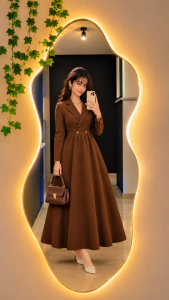
Use the example image above as inspiration for your own AI-generated mirror selfie.
Just Upload your image and use this prompt which is given below and then your Yellow Mirror selfie image is ready to upload your Instagram account with using some trending song so that your reel is ready to go viral.
Yellow Mirror Selfie AI Prompt
Copy the prompt below and paste it into your preferred AI image editing tool along with your photo.
Transform my uploaded photo into a realistic, full-body luxury mirror selfie. Strictly preserve my exact face, identity, hairstyle, skin tone, body proportions and original outfit. Do not change, replace, redesign or modify my clothes, accessories or footwear.

Place me in front of a beautiful, irregular wavy full-length mirror with warm golden LED lighting around its entire edges. Add elegant green hanging ivy plants on the beige wall, a dark modern background inside the mirror and warm cinematic ambient lighting.

Create a natural mirror selfie pose with a smartphone in my hand, maintaining my original appearance. Use a premium Pinterest-inspired aesthetic, professional fashion photography, realistic details, soft shadows and a luxurious warm atmosphere.

Vertical 9:16 composition, full-body view, complete mirror visible from top to bottom.

Do not crop my head or feet. The final image should look like a real professional photograph.
How to Create a Yellow Mirror Selfie Using AI
Creating this aesthetic mirror selfie is simple. Follow these steps:
- First, choose a clear photo of yourself that you want to edit.
- Open an AI image editing tool that supports photo uploads and prompt-based editing.
- Upload your original photograph.
- Copy the Yellow Mirror Selfie AI Prompt given above.
- Paste the complete prompt into the tool.
- Generate your edited image and check whether your face and original outfit have been preserved.
- If necessary, regenerate the image with clearer instructions about identity and outfit preservation.
- Save your final image and share it on Instagram, Pinterest, or other social media platforms.
What Is an AI Mirror Selfie Prompt?
An AI mirror selfie prompt is a written instruction that helps an AI image editing tool transform an uploaded photograph into a different photographic setting or style.
You can use these prompts to create realistic mirror selfies, aesthetic portraits, fashion photography, and Pinterest-inspired pictures. By providing clear instructions about the background, lighting, mirror, and photo composition, you can guide the AI tool toward the result you want.
What Is the Yellow Mirror Selfie AI Prompt?
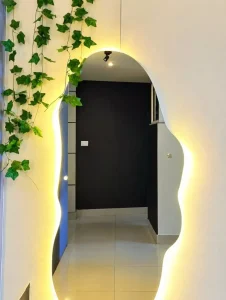
The Yellow Mirror Selfie AI Prompt is designed to create a warm and luxurious mirror selfie with a beautiful irregular wavy mirror surrounded by golden LED lighting.
This editing style includes a beige wall, green hanging ivy plants, a dark modern interior visible inside the mirror, and soft cinematic lighting. It gives your photo a premium and natural appearance while keeping your original face, hairstyle, skin tone, outfit, and accessories unchanged.
Tips for Getting a Realistic AI Mirror Selfie
For better results, use a clear, high-quality original photograph. Make sure your face and outfit are visible, especially if you want a full-body mirror selfie.
Also, use a prompt that clearly explains which parts of your original photo should remain unchanged. If the AI tool changes your outfit or facial appearance, repeat the instruction to preserve your original identity and clothing.
Conclusion
Friends, I hope you liked this Yellow Mirror Selfie AI Prompt. With this simple prompt, you can give your ordinary photo a beautiful golden mirror selfie look without manually editing the background or adding lighting effects.
Try this prompt with your own photograph and create a Pinterest-inspired mirror selfie for your Instagram profile. If you have any questions about using the prompt, feel free to leave a comment. We would love to help!
Queries cover this article- Yellow Mirror Selfie AI Prompt, yellow mirror selfie prompt, AI mirror selfie prompt, golden mirror selfie AI prompt, Instagram mirror selfie prompt, AI photo editing prompt, ChatGPT photo editing prompt, wavy mirror selfie prompt, Pinterest mirror selfie aesthetic, luxury mirror selfie, golden LED mirror photo editing, realistic mirror selfie AI, aesthetic mirror selfie photo, full body mirror selfie prompt, AI selfie editing